> ## Documentation Index
> Fetch the complete documentation index at: https://tbd-6fc993ce-hypeship-update-create-pool-guidance.mintlify.site/llms.txt
> Use this file to discover all available pages before exploring further.
# Web Bot Auth (WBA)
> Use Web Bot Auth (WBA) to give your agents a verifiable identity. Request KERNEL’s opt-in WBA token on Startup and Enterprise plans.
[Web Bot Auth (WBA)](https://datatracker.ietf.org/doc/html/draft-meunier-web-bot-auth-architecture) lets your browser agent cryptographically sign requests so participating websites can verify its identity. Sites that recognize and allow that identity can let your agent continue with fewer bot challenges and interruptions.
We offer **KERNEL's WBA token** as an **opt-in feature**, enabled selectively on request for **Startup Plan and Enterprise Plan customers**. It's not enabled by default.
## Request WBA access
To request access, [contact support](mailto:support@kernel.sh) with your use case and the websites you want to access. We review requests and enable the feature selectively; being on an eligible plan doesn't automatically turn it on.
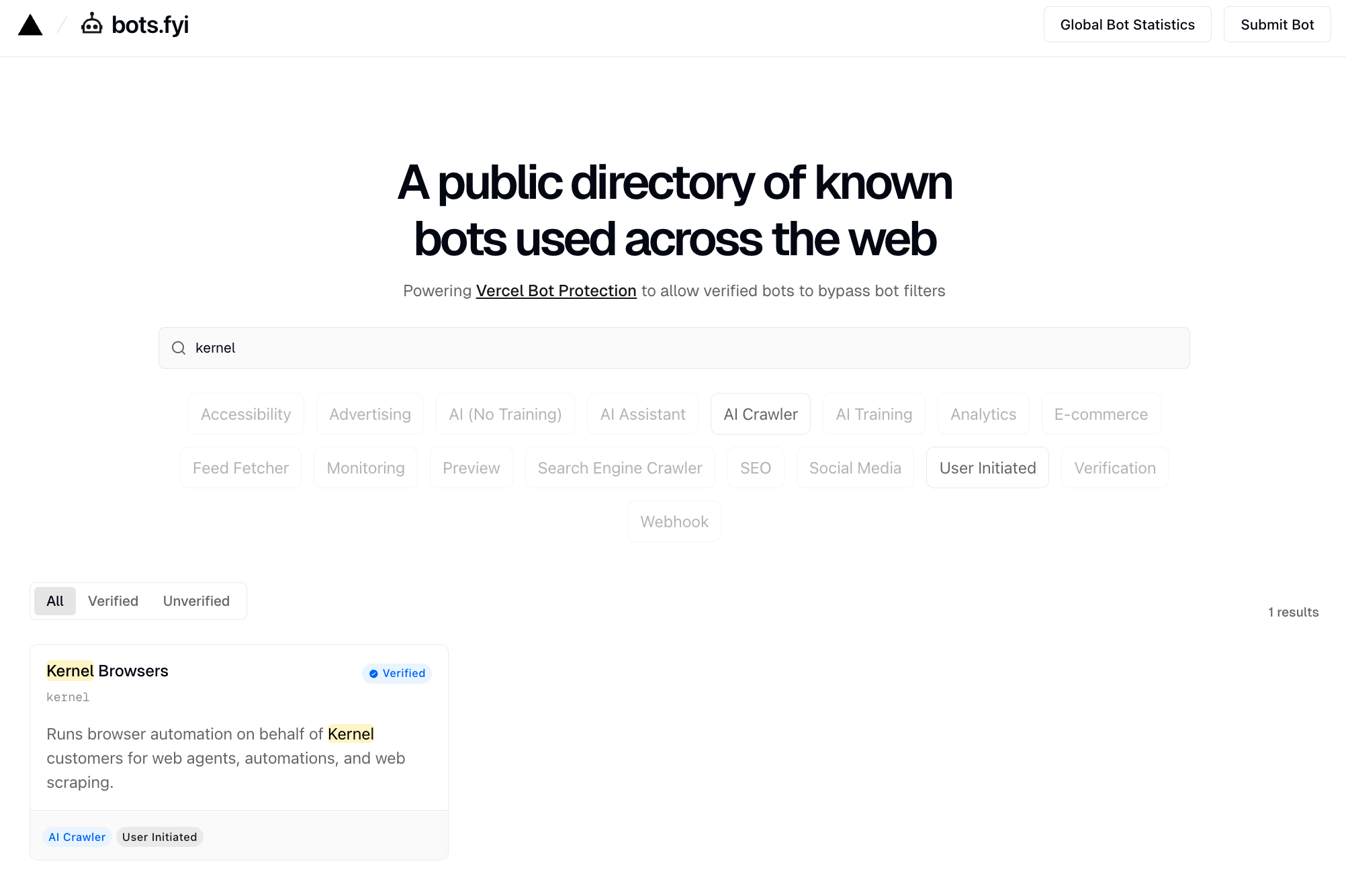
With KERNEL's WBA token, you can sign requests using one of our bot identities instead of registering your own identity. KERNEL is listed in [Vercel's public directory](https://bots.fyi/d/kernel) and [Cloudflare's bots and agents directory](https://radar.cloudflare.com/bots/directory/kernel). See [Bots and agents](/bots) for our identities and their public key directories.
 ### Why use WBA?
WBA gives participating sites a verifiable identity they can use when deciding whether to allow your agent. For workflows interrupted by bot checks, this can mean fewer challenges, fewer retries, and less time spent handling blocked requests on sites that accept the identity.
WBA complements [stealth mode](/browsers/bot-detection/stealth) and [proxies](/proxies/overview). Those features address browser and network signals; WBA adds cryptographic identity that a site can verify.
WBA verifies the signing identity. Each website still decides whether to allow its requests. WBA doesn't guarantee access to every site or replace user login, permissions, or site rate limits.
## How it works
WBA uses HTTP message signatures to identify the signer of a request. The extension in the examples below adds cryptographic signature headers to outgoing HTTP requests:
* **`Signature`**: The RFC 9421 signature of the request
* **`Signature-Input`**: Metadata about how the signature was created
* **`Signature-Agent`**: URL that points to your key directory
Platforms like [Vercel](https://bots.fyi/) or other hosting providers can verify these signatures against your public key, confirming the signing identity before applying their access policies.
## Quick start with test key
To try WBA signature verification, build an extension with the test key and visit the [test verification site](https://http-message-signatures-example.research.cloudflare.com/).
This example uses a public test key. It doesn't enable KERNEL's WBA token or establish a production identity. To use our identity, [request access](#request-wba-access).
### 1. Build the extension
Use the Kernel CLI to build the Web Bot Auth extension:
```bash theme={null}
kernel extensions build-web-bot-auth --to ./web-bot-auth-ext --upload my-web-bot-auth
```
The build command requires Node.js and npm to be installed on your system.
### 2. Create a browser with the extension
```bash CLI theme={null}
# Create a browser with the web-bot-auth extension
kernel browsers create --extension my-web-bot-auth
# The command outputs the browser ID and live view URL
# Open the live view URL in your browser, then navigate to:
# https://http-message-signatures-example.research.cloudflare.com/
```
```typescript TypeScript theme={null}
import { Kernel } from "@onkernel/sdk";
import { chromium } from "playwright";
const kernel = new Kernel();
// Create browser with web-bot-auth extension
const browser = await kernel.browsers.create({
extensions: [{ name: "my-web-bot-auth" }],
});
// Connect via Playwright
const pw = await chromium.connectOverCDP(browser.browser_url);
const context = pw.contexts()[0];
const page = context?.pages()[0] || await context.newPage();
// Navigate to a page - requests will be automatically signed
await page.goto("https://http-message-signatures-example.research.cloudflare.com/");
```
```python Python theme={null}
from kernel import Kernel
from playwright.sync_api import sync_playwright
kernel = Kernel()
# Create browser with web-bot-auth extension
browser = kernel.browsers.create(extensions=[{"name": "my-web-bot-auth"}])
# Connect via Playwright
with sync_playwright() as p:
pw = p.chromium.connect_over_cdp(browser.browser_url)
context = pw.contexts[0]
page = context.pages[0] if context.pages else context.new_page()
# Navigate to a page - requests will be automatically signed
page.goto("https://http-message-signatures-example.research.cloudflare.com/")
```
### 3. Verify it's working
Navigate to the [test site](https://http-message-signatures-example.research.cloudflare.com/) to verify your signatures are being accepted:
This site validates requests signed with the RFC9421 test key and shows whether the signature was verified successfully.
## Using your own keys
If you want to sign production requests with your own identity, use your own signing keys and publish a public key directory. This is an alternative to requesting KERNEL's WBA token.
### 1. Generate an Ed25519 key pair
Create a JWK file with your Ed25519 private key. The key must include both the public (`x`) and private (`d`) components:
```json my-key.jwk theme={null}
{
"kty": "OKP",
"crv": "Ed25519",
"x": "YOUR_PUBLIC_KEY_BASE64URL",
"d": "YOUR_PRIVATE_KEY_BASE64URL"
}
```
See [web-bot-auth documentation](https://github.com/cloudflare/web-bot-auth) for tools to generate Ed25519 key pairs.
### 2. Host your public key
For websites to verify your signatures, you need to host your public key at a well-known URL. Create a key directory at:
```
https://yourdomain.com/.well-known/http-message-signatures-directory
```
The directory should contain your public keys in JWKS format:
```json theme={null}
{
"keys": [
{
"kty": "OKP",
"crv": "Ed25519",
"x": "YOUR_PUBLIC_KEY_BASE64URL",
"kid": "YOUR_KEY_ID"
}
],
"purpose": "your-bot-purpose"
}
```
### 3. Build with your key and hosted key directory
```bash theme={null}
kernel extensions build-web-bot-auth \
--to ./web-bot-auth-ext \
--key ./my-key.jwk \
--signature-agent https://yourdomain.com \
--upload my-web-bot-auth
```
### 4. Register with WBA-aware directories (optional)
If you want Vercel-protected sites to recognize your agent, you can register your key directory with [Vercel](https://bots.fyi/new-bot). Kernel is officially listed in the Vercel directory.
## References
* [Vercel's Public Directory](https://bots.fyi/?query=kernel)
* [Web Bot Auth GitHub Repository](https://github.com/cloudflare/web-bot-auth)
* [Web Bot Auth Documentation](https://developers.cloudflare.com/bots/reference/bot-verification/web-bot-auth/)
* [RFC 9421 - HTTP Message Signatures](https://datatracker.ietf.org/doc/html/rfc9421)
* [Test Verification Site](https://http-message-signatures-example.research.cloudflare.com/)
* [Web Bot Auth Architecture Draft](https://thibmeu.github.io/http-message-signatures-directory/draft-meunier-web-bot-auth-architecture.html)
### Why use WBA?
WBA gives participating sites a verifiable identity they can use when deciding whether to allow your agent. For workflows interrupted by bot checks, this can mean fewer challenges, fewer retries, and less time spent handling blocked requests on sites that accept the identity.
WBA complements [stealth mode](/browsers/bot-detection/stealth) and [proxies](/proxies/overview). Those features address browser and network signals; WBA adds cryptographic identity that a site can verify.
WBA verifies the signing identity. Each website still decides whether to allow its requests. WBA doesn't guarantee access to every site or replace user login, permissions, or site rate limits.
## How it works
WBA uses HTTP message signatures to identify the signer of a request. The extension in the examples below adds cryptographic signature headers to outgoing HTTP requests:
* **`Signature`**: The RFC 9421 signature of the request
* **`Signature-Input`**: Metadata about how the signature was created
* **`Signature-Agent`**: URL that points to your key directory
Platforms like [Vercel](https://bots.fyi/) or other hosting providers can verify these signatures against your public key, confirming the signing identity before applying their access policies.
## Quick start with test key
To try WBA signature verification, build an extension with the test key and visit the [test verification site](https://http-message-signatures-example.research.cloudflare.com/).
This example uses a public test key. It doesn't enable KERNEL's WBA token or establish a production identity. To use our identity, [request access](#request-wba-access).
### 1. Build the extension
Use the Kernel CLI to build the Web Bot Auth extension:
```bash theme={null}
kernel extensions build-web-bot-auth --to ./web-bot-auth-ext --upload my-web-bot-auth
```
The build command requires Node.js and npm to be installed on your system.
### 2. Create a browser with the extension
```bash CLI theme={null}
# Create a browser with the web-bot-auth extension
kernel browsers create --extension my-web-bot-auth
# The command outputs the browser ID and live view URL
# Open the live view URL in your browser, then navigate to:
# https://http-message-signatures-example.research.cloudflare.com/
```
```typescript TypeScript theme={null}
import { Kernel } from "@onkernel/sdk";
import { chromium } from "playwright";
const kernel = new Kernel();
// Create browser with web-bot-auth extension
const browser = await kernel.browsers.create({
extensions: [{ name: "my-web-bot-auth" }],
});
// Connect via Playwright
const pw = await chromium.connectOverCDP(browser.browser_url);
const context = pw.contexts()[0];
const page = context?.pages()[0] || await context.newPage();
// Navigate to a page - requests will be automatically signed
await page.goto("https://http-message-signatures-example.research.cloudflare.com/");
```
```python Python theme={null}
from kernel import Kernel
from playwright.sync_api import sync_playwright
kernel = Kernel()
# Create browser with web-bot-auth extension
browser = kernel.browsers.create(extensions=[{"name": "my-web-bot-auth"}])
# Connect via Playwright
with sync_playwright() as p:
pw = p.chromium.connect_over_cdp(browser.browser_url)
context = pw.contexts[0]
page = context.pages[0] if context.pages else context.new_page()
# Navigate to a page - requests will be automatically signed
page.goto("https://http-message-signatures-example.research.cloudflare.com/")
```
### 3. Verify it's working
Navigate to the [test site](https://http-message-signatures-example.research.cloudflare.com/) to verify your signatures are being accepted:
This site validates requests signed with the RFC9421 test key and shows whether the signature was verified successfully.
## Using your own keys
If you want to sign production requests with your own identity, use your own signing keys and publish a public key directory. This is an alternative to requesting KERNEL's WBA token.
### 1. Generate an Ed25519 key pair
Create a JWK file with your Ed25519 private key. The key must include both the public (`x`) and private (`d`) components:
```json my-key.jwk theme={null}
{
"kty": "OKP",
"crv": "Ed25519",
"x": "YOUR_PUBLIC_KEY_BASE64URL",
"d": "YOUR_PRIVATE_KEY_BASE64URL"
}
```
See [web-bot-auth documentation](https://github.com/cloudflare/web-bot-auth) for tools to generate Ed25519 key pairs.
### 2. Host your public key
For websites to verify your signatures, you need to host your public key at a well-known URL. Create a key directory at:
```
https://yourdomain.com/.well-known/http-message-signatures-directory
```
The directory should contain your public keys in JWKS format:
```json theme={null}
{
"keys": [
{
"kty": "OKP",
"crv": "Ed25519",
"x": "YOUR_PUBLIC_KEY_BASE64URL",
"kid": "YOUR_KEY_ID"
}
],
"purpose": "your-bot-purpose"
}
```
### 3. Build with your key and hosted key directory
```bash theme={null}
kernel extensions build-web-bot-auth \
--to ./web-bot-auth-ext \
--key ./my-key.jwk \
--signature-agent https://yourdomain.com \
--upload my-web-bot-auth
```
### 4. Register with WBA-aware directories (optional)
If you want Vercel-protected sites to recognize your agent, you can register your key directory with [Vercel](https://bots.fyi/new-bot). Kernel is officially listed in the Vercel directory.
## References
* [Vercel's Public Directory](https://bots.fyi/?query=kernel)
* [Web Bot Auth GitHub Repository](https://github.com/cloudflare/web-bot-auth)
* [Web Bot Auth Documentation](https://developers.cloudflare.com/bots/reference/bot-verification/web-bot-auth/)
* [RFC 9421 - HTTP Message Signatures](https://datatracker.ietf.org/doc/html/rfc9421)
* [Test Verification Site](https://http-message-signatures-example.research.cloudflare.com/)
* [Web Bot Auth Architecture Draft](https://thibmeu.github.io/http-message-signatures-directory/draft-meunier-web-bot-auth-architecture.html)